


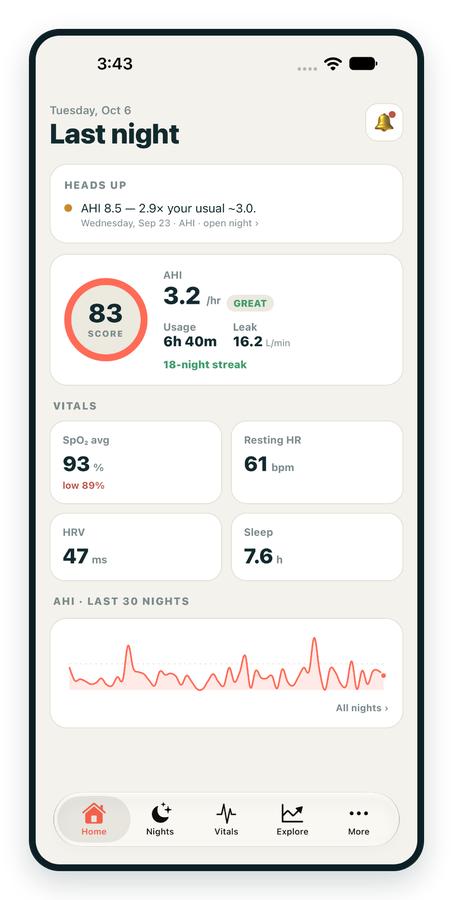
iPhone / iPhone Duo Live
Last night before you are out of bed. Apple Health vitals, Face ID.
Download on the App Store Apnealytics
Free on every plan: unlimited imports, the full dashboard and your last 30 nights.
 Compatibility checkerWill my machine work?Type your model. You get a straight answer: supported, partial, waitlist, or why not.Check my machine
 If it writes an SD card, we probably read it. ResMed AirMini has no card, so no app can read it.
Sleep Check-up
3 of 6 checks done
Six short screeners, one picture of how you sleep. Earn a milestone for each, save results and get retake reminders.
Latest milestone: Sleepiness check done
 NEWTrack your 90-day compliance windowOpen the calculator
 13 free tools. No account needed — sign in to save results and fill answers from your own CPAP data.
Last night before you are out of bed. Apple Health vitals, Face ID.
Download on the App Store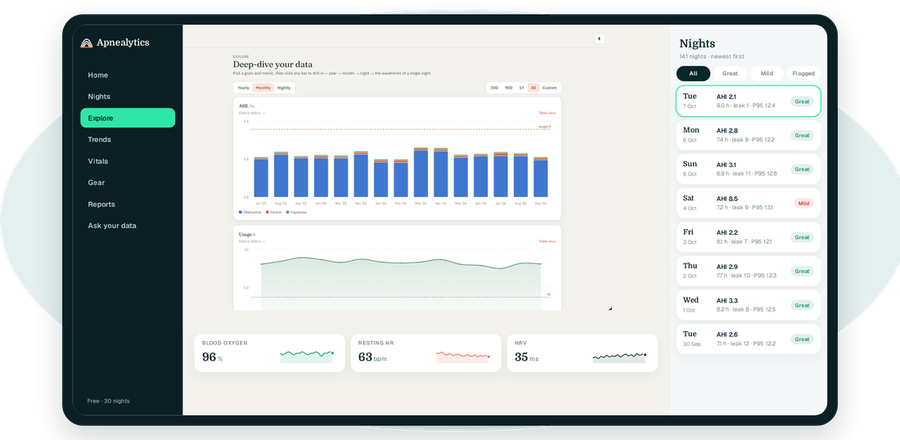
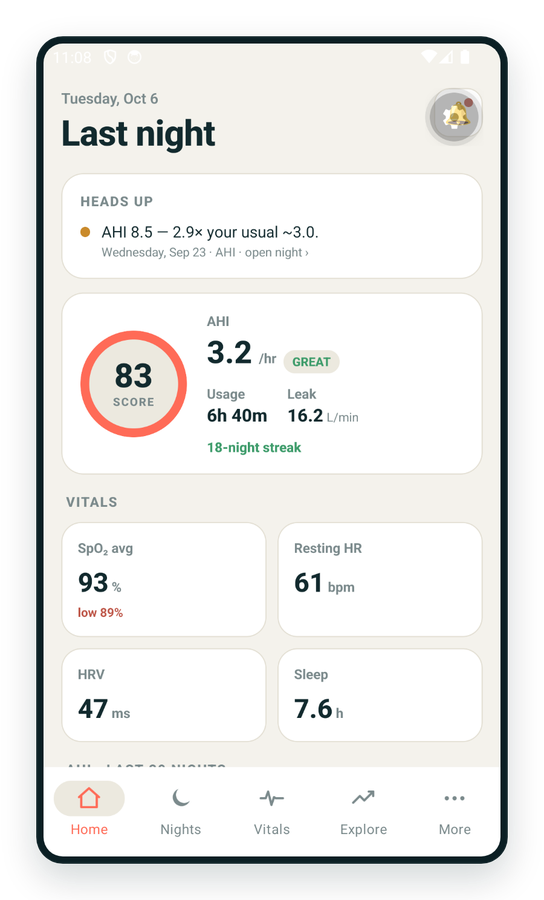
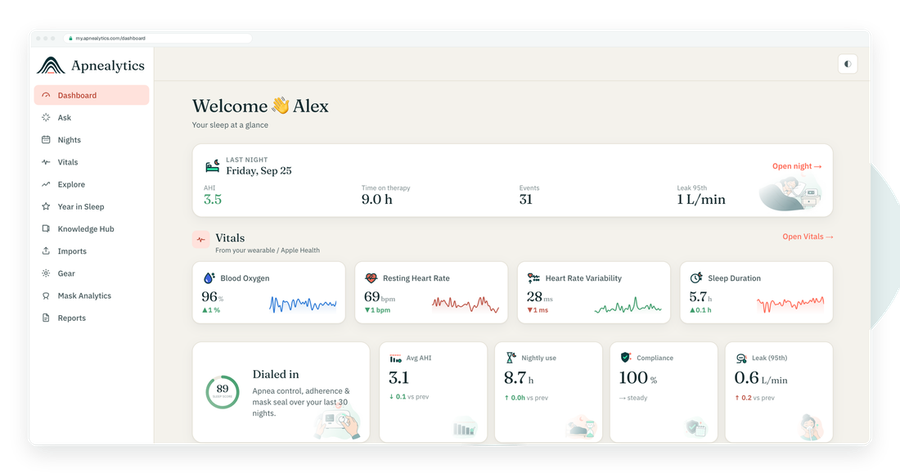
One account on every screen. Apple Watch vitals sync through Apple Health.
This Apnealytics FAQ answers the questions we hear most: how to get your CPAP data in, which machines work, what the numbers mean, what Pro costs and how we look after your data. If your question is not here, the Help Center has step-by-step guides, and you can always send us feedback.
No answers match that search. Try fewer words, or send us your question.
5 questions
Apnealytics is a CPAP data app. It reads the detailed data your machine records each night and turns it into a clear dashboard: AHI, usage, leak, pressure, events and trends over time. It runs on the web, iPhone, iPad and Android. It is a tracking and coaching tool for you and your clinician, not a medical device. See the dashboard for what a night looks like.
Create a free account on the web portal at my.apnealytics.com with a magic link, Google sign-in or email and password. Take the SD card out of your CPAP machine, put it in a card reader and upload it. Your nights appear in a few minutes. The getting started guide walks through each step with screenshots.
For the first SD card upload, yes: card import runs on the web portal today, from any computer with a browser and an SD card reader. After that, the iPhone, iPad and Android apps show the same nights, trends and alerts. The phone apps can also import CSV and JSON exports and sync Apple Health or Health Connect.
Yes. The Free plan is $0 forever and includes unlimited imports, the nightly dashboard, the last 30 nights of history, Apple Health and Health Connect sync, Ask your data, the Knowledge Hub, family logins and data export. Pro adds full history, waveforms, oximetry, reports and sharing. See pricing.
Yes. You can add family members as separate logins on one account at no cost, and each person signs in with their own email. If the account has Pro, it covers every login on that account. See family members on one account.
5 questions
Power off your machine, remove the SD card, and insert it into a card reader on your computer. On the web portal, choose Import and select the card or its folder. Files go straight to private cloud storage with a resumable, folder-aware upload. Put the card back in the machine afterwards so it keeps recording. See SD card import.
No. Imports are incremental: when you upload the same card again, Apnealytics adds only the new nights and skips the ones it already has. You can see every past upload in your import history and re-process one if needed. Uploading weekly or monthly works well for most people.
Uploads are resumable, so first try again from the same card and it should pick up where it stopped. Check that your connection is stable and the browser tab stays open. A faulty card reader is a common cause, so try another if it keeps failing. The upload troubleshooting guide covers the rest.
Most often the card was not back in the machine, the night was not on the card you uploaded, or the session was very short. Your machine also writes the night when therapy ends, so upload after you have turned it off in the morning. See no data for last night for a full checklist.
The phone apps import CSV and JSON exports and sync daily summaries from Apple Health or Health Connect. Reading an SD card is web-only today, because the card files are large and need a card reader. Once a card is uploaded on the web, every night appears in the apps automatically.
5 questions
Supported: ResMed AirSense 10 and 11, AirCurve 10 and 11, and the S9 and Lumis families; Philips DreamStation 1 and 2; and Fisher & Paykel SleepStyle. Löwenstein and DeVilbiss machines have partial support. React Health Luna G3 and Transcend Micro are on the waitlist. Check your model with the compatibility checker.
No. The AirMini has no SD card, so its detailed data cannot be read by Apnealytics or any other independent tool. Its summary data is available only through ResMed's own app. If you use an AirMini for travel and another ResMed machine at home, your home machine's nights will still import normally. See AirMini.
It means we do not read that machine's data yet but plan to. Joining the waitlist from the machine's page tells us demand and lets us email you when support goes live. Sharing a sample of your card's data through the feedback page helps us build and test support faster.
Yes. Log your masks in Gear, choosing from a catalog of common models, and Mask Analytics shows seal, AHI and usage for each mask you have used. It is a clear way to compare an old and new mask. Gear also sends replacement reminders for cushions, filters and tubing. See mask fit and leak.
Apnealytics reads the Wellue O2Ring, CMS50-family devices from Contec via CSV, ResMed SAD.edf files, and any oximeter that exports EDF or CSV. SpO₂ and pulse are overlaid on your night, with ODI₃, ODI₄ and T90. Oximetry is a Pro feature. See oximeters and import oximeter CSV.
4 questions
Yes. The Apnealytics app for iPhone and iPad is on the App Store, and the Android app for phones and tablets is on Google Play. Both show your dashboard, nights, trends and alerts, and both sync with the health store on your device. See the apps.
Not a standalone one. Apple Watch data reaches Apnealytics through Apple Health: resting heart rate, HRV, SpO₂ and sleep hours appear beside your therapy in the iPhone and iPad app. See Apple Watch and your CPAP data for exactly what syncs.
Yes. Your data lives in your Apnealytics account, so anything you upload on the web appears in the apps, and anything synced from Apple Health or Health Connect appears on the web.
No. Push notifications, such as a reminder that gear is due or that your usage has slipped, are written without health numbers so nothing sensitive appears on your lock screen. You can turn each type of notification on or off in the app's settings.
5 questions
The Sleep Score is a 0–100 summary of your CPAP night, built from AHI, usage hours and leak. The three component bars beneath it show which one moved. It is meant for a quick morning glance and a clean trend line, not as a measure of sleep stages or how rested you feel. See Sleep Score explained.
They are Apnealytics' bands for your residual AHI on CPAP: Great under 5, Mild 5 to under 15, Moderate 15 to under 30, and High 30 or more. They are not a diagnosis of sleep apnea severity, which comes from a sleep study. See what is a good AHI on CPAP.
Heads up flags a night that is unusual for you, in plain words, such as "AHI 8.5 — 2.9× your usual ~3.0". What changed? lists settings changes, such as pressure, EPR or mask, and points where your trend shifted. Together they help you connect a bad night or week to its likely cause.
Yes, with Pro. Open any night to see airflow, pressure and leak traces with event strips, a crosshair and zoom. Waveforms are parsed on demand in your browser or on your phone, so they load only when you ask for them. See the breath-by-breath viewer and reading CPAP waveforms.
Free shows the last 30 nights. Pro shows your full history, back to the first night on your card, with Explore drill-down from year to month to night and period-over-period comparisons. See History and trends.
4 questions
Yes, with Pro. Compliance autopilot scans your nights, finds a qualifying 30-day window automatically and drafts the letter, and you can download a doctor-ready PDF. The free compliance calculator checks where you stand first. See compliance report.
Create a share link (Pro). It is a private, read-only web page showing your aggregate therapy data. Links are tokenized, not indexed by search engines, exclude health identifiers by default, and you can revoke one at any time. Your clinician needs no account. See share with your doctor.
Yes, on any plan. Export downloads your therapy data so you can keep a copy or use it in another tool. Pro also includes a personal REST API with API keys if you want to build your own views. See export or delete your data.
Year in Sleep is an annual recap of your CPAP therapy, built from a year of your own nights, so you can see how the year went at a glance and share the highlights if you want to. It is a Pro feature. See Year in review.
6 questions
Pro is $8.99 a month or $99.99 a year, and you can cancel anytime. It adds full history, per-night waveforms, oximetry overlays, PDF reports, share links, multiple machines with full gear history, and the API. The App Store and Google Play may show prices in your local currency. See pricing.
Three places: by card on the web portal, by in-app purchase on the App Store, or by in-app purchase on Google Play. All three are handled through RevenueCat, our subscription system, and unlock the same Pro plan on your account wherever you sign in.
Cancel where you subscribed. Web subscriptions are cancelled in the portal's billing settings. App Store subscriptions are cancelled in your Apple ID subscription settings, and Google Play subscriptions in the Play Store. You keep Pro until the end of the period you paid for. See manage subscription and billing.
Purchases made through the App Store or Google Play follow Apple's and Google's refund policies, so request those through the store. For web purchases, contact us at info@apnealytics.com and we will look at each case individually.
Yes. Pro is per account, so one subscription lifts every family login on that account. Each person still has their own login and their own nights. See family members on one account.
You keep your account, your imports and the last 30 nights on the dashboard. Pro-only features such as waveforms, reports and share links stop working at the end of your paid period. Older nights stay stored and reappear if you upgrade again.
4 questions
No. Apnealytics has no ads, uses no third-party trackers on health pages, and never sells your data. Your therapy data is used to show it back to you, and for nothing else unless you choose to share it. See privacy and security.
Every connection uses TLS. Each table in our database has row-level security, so accounts cannot see each other's data. Raw SD card files sit in private storage behind short-lived signed links. Sign-in is rate-limited, sessions are revocable on the server, and email addresses are verified.
Yes. You can export everything first, then delete your account from settings. Deletion of your data completes within 30 days. See export or delete your data.
Only if you use it, and only to the provider you choose. Ask your data works with your own OpenAI or Anthropic API key, so your questions go to that provider under its terms. Access is read-only and scoped to your account. See Ask your data.
4 questions
No. Apnealytics is a tracking and coaching tool. It is not FDA-cleared, does not diagnose or treat any condition, and is not for emergencies. Numbers estimated by your CPAP machine are estimates. Always talk to your clinician before changing your therapy. See our medical disclaimer.
They measure different things. A sleep study counts events per hour of sleep, using airflow, oxygen and brain waves, before treatment. Your machine estimates events per hour of mask use from airflow alone, while treating you. The machine number is your residual AHI: a good trend indicator, not a diagnosis. See what is AHI.
Pressure is a clinical setting, so changes should be made by or with your clinician. What Apnealytics can do is help you bring the right evidence: your P95 pressure, residual AHI, event mix and leak over several weeks. A share link or PDF report makes that conversation quicker. See CPAP pressure settings explained.
A few central or clear airway events are common, especially in the first weeks. A share that rises over time, or appears after a pressure increase, is worth showing your clinician. Do not change settings yourself. The dashboard's event composition ring shows your mix. See central vs obstructive apnea on CPAP.
4 questions
No. Screeners such as NoSAS, STOP-Bang and Berlin estimate how likely sleep apnea is, and others look at sleepiness, insomnia or nasal blockage. Only a licensed clinician can diagnose. Each tool cites its published source and ends with concrete next steps. See all free CPAP and sleep tools.
The Sleep Check-up is a set of six short screeners shown as a progress meter, for example "3 of 6 checks done". Each completed check adds a milestone, and if you are signed in your results are saved so you can compare with last time and get a reminder when a retake is due. It works without an account, but saves only when you sign in.
Some can, if you are signed in. The AHI lookup can pull last night or your 7- or 30-night average, the compliance calculator counts compliant nights from your uploads, the battery calculator uses your real P95 pressure, and the mask finder can show Mask Analytics for masks you have logged.
Some questionnaires, such as the Epworth Sleepiness Scale and the Insomnia Severity Index, are licensed and their wording cannot be reproduced without permission. For those, you take the questionnaire from your clinician or the official source and enter your total, and we interpret it and track it over time. See the Epworth tool.
 DashboardSleep Score, AHI band, leak and pressure
 Trends & historyA year down to a night
 Breath-by-breath viewerAirflow, pressure, leak tracesPro
 SpO₂ overlayOximeter data on the same nightPro
 Pressure insightsP95, set range, EPR and ramp
 SD card importDrop the card folder, only new nights added
 Mask fit & gearWhich mask actually seals
 Ask your dataPlain-English questions, your own AI keyBYOK
 Year in SleepYour therapy year in one storyNew
 Compliance reportFinds the qualifying window for youPro
 Share with your doctorRead-only, revocable links
 Companion appiPhone, iPad and Android
 Privacy & securityYour data, locked to you
 ResMed AirSense 10 & 11Supported
 ResMed AirCurve 10 & 11 VAutoSupported
 ResMed S9 / LumisSupported
 Philips DreamStation 1 & 2Supported
 Fisher & Paykel SleepStyleSupported
 Löwenstein / DeVilbissPartial
 React Health Luna G3Waitlist
 Transcend MicroWaitlist
 Full face masksFit, leak signature, Mask Analytics
 Nasal masksOver-nose and cradle styles
 Nasal pillowsMinimal-contact fit tips
 Wellue O2RingSupported
 Contec CMS50 familySupported
 Apple Health / Health ConnectResting HR, HRV, SpO₂, sleepSupported
 What is AHI?The apnea-hypopnea index, explained
 What is a good AHI on CPAP?
 CPAP leak rate explained
 Pressure settings explained
 Reading CPAP waveformsAll 14 explainers
 Apnealytics vs SleepHQ
 Apnealytics vs OSCAR
 Apnealytics vs myAir
 Apnealytics vs DreamMapper
 SleepHQ vs OSCARBest CPAP apps in 2026
 How to read CPAP dataStart here: six numbers, in order
 Read your CPAP SD card
 Share data with your doctorChoosing a CPAP mask
 Travel with CPAPAll guides
 Mask finderSeven questions, a ranked mask typeYour data
 Machine finderA two-machine shortlist for your prescription
 iPhone / iPhone DuoLast night before you are out of bed. Apple Health vitals, Face ID.Live
 iPadSame universal app, side-by-side panes and full-width waveforms.Live
 AndroidPhones, tablets and foldables, with Health Connect built in.Live
 Web portalWhere your SD card goes. Every chart, report and setting.Live

